








Review Hub Lite
Review Hub Lite adds Figma-style comment pins to the front end of any WordPress site. Click anywhere on a live page to drop a comment, reply in threads, and mark it resolved — no more screenshots, spreadsheets, or "third section, second paragraph" emails.
Overview & Features
Website feedback usually turns into a mess: red-arrow screenshots, long email chains, and notes nobody can place on the actual page. Review Hub Lite puts the conversation exactly where the work is — pinned to the live page.
Flip on Review Mode, click the spot you want to talk about, and a numbered pin appears with your comment. Your client or team replies in a thread under that pin. When it's handled, mark it resolved and the pin turns green. Feedback stays anchored to the page, so "this bit" is never a mystery.
Built for Divi, and free.
Pin A Comment Anywhere
Click any point on the page to leave a comment exactly where it belongs. Each pin is numbered for easy reference.
Reply In Threads
Discuss each pin in its own conversation, with replies grouped under the comment they belong to.
Attach An Image
Drop or paste a screenshot or reference image straight into a comment.
Open & Resolved Statuses
Keep track of what's outstanding. Open pins stand out; resolved pins turn green and step aside.
Filter The View
Switch between All, Open, and Resolved to focus on what matters right now.
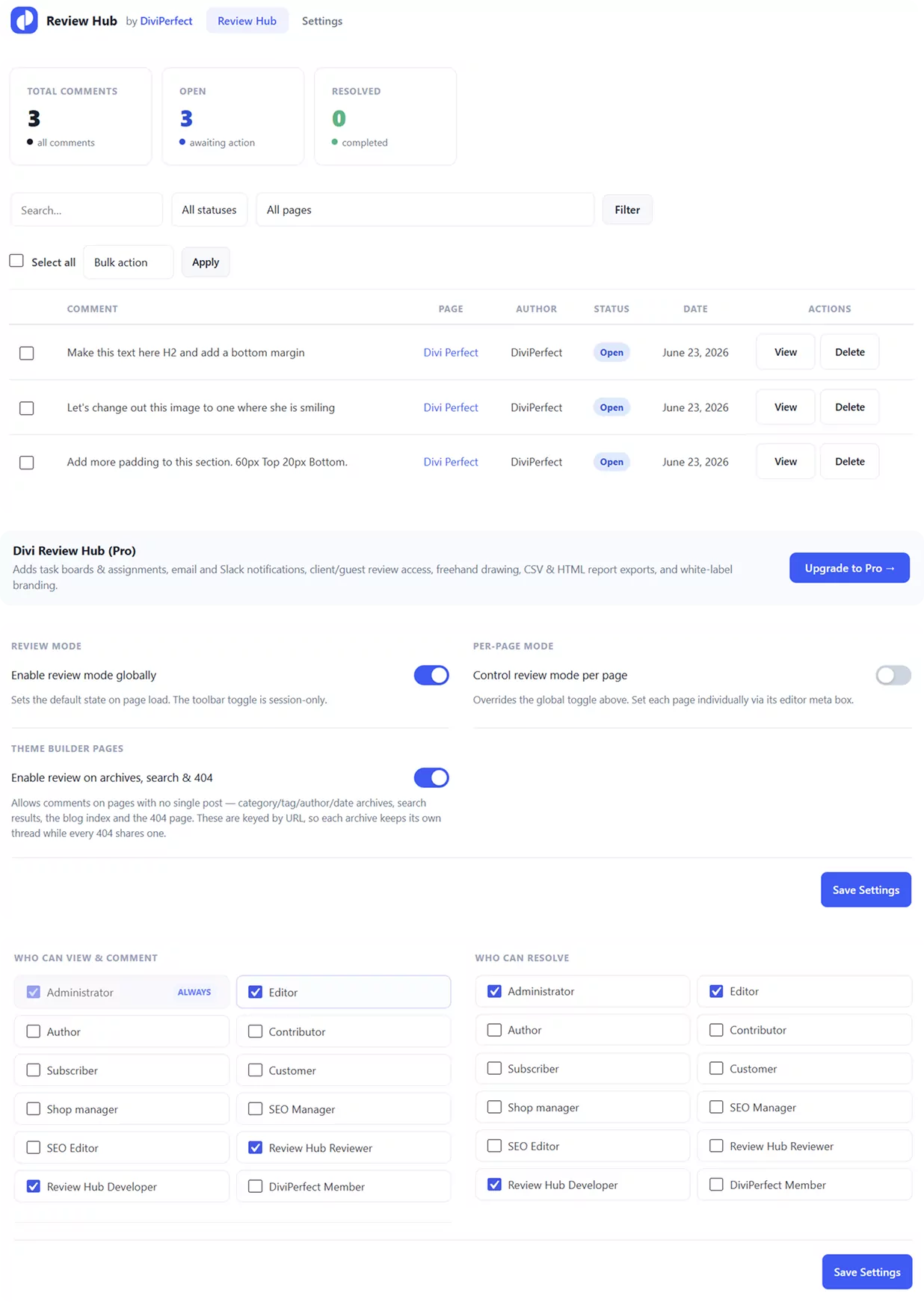
A Clean Dashboard
Totals for all comments, open items, and resolved items at a glance, with a searchable list and bulk actions.
Role-based Access
Decide which roles can view, comment, and resolve. Reviewer and Developer roles are added for you.
Light & Dark Mode
A built-in toggle for the on-page review toolbar, remembered between visits.
Private & Self-contained
No external services, no tracking, no third-party calls. Every comment lives in your own database, served through the WordPress REST API and protected by nonces and capability checks.
Installation
Download the plugin
Download review-hub-lite.zip from your DiviPerfect account or the Elegant Themes Marketplace.
Upload to WordPress
In your WordPress admin, navigate to Plugins → Add New → Upload Plugin. Click Choose File, select the zip you downloaded, then click Install Now
Activate the plugin
Once the upload completes, click Activate Plugin. The plugin is now active and running on your site with sensible defaults.
Open the settings panel
Go to DiviPerfect → Review Hub Lite in your WordPress admin menu.
Made for the Divi builder
Review Hub Lite understands how Divi is built. When you drop a pin, it anchors to the exact section, row, column, or module it sits on — so as you rework a layout in the Visual Builder, the feedback stays attached to the right element instead of drifting off.
That makes it a natural fit for handing designs to clients, collecting stakeholder sign-off, or tracking your own to-dos across a build — right inside the Divi site you're already working in.
Not on Divi everywhere? It still works. Pins place by position, so classic themes, the block editor, and other builders are covered too
How it works
Turn on Review Mode
A slim toolbar sits on the front end for the users you allow. Flip the switch to start reviewing.
Click to pin
Press C (or the Comment button) and click anywhere on the page. Type your note and post it.
Discuss and resolve
Replies stack up in the thread. When it's done, mark it resolved — the pin turns green and the list updates.
Lite vs Pro
Review Hub Lite covers the core review workflow for free. When you're ready to run full projects on top of your reviews, Divi Review Hub adds the rest:
Your Lite comments and settings carry straight over when you upgrade.
Review Hub Lite
Free
Pro Upgrade
Divi Review Hub
$49.99 yearly
Support
If you run into any issues or have questions not covered in this documentation, the DiviPerfect support team is happy to help.
Reach out via the support tab on the Elegant Themes Marketplace product page, or email us directly at hello@diviperfect.com. We aim to respond within 24 hours on business days.

Frequently Asked Questions
Find answers to the most common questions about our Review Hub Lite Plugin.
Is it really free?
Yes. Review Hub Lite is free to download and use, with no time limits or trials.
Do I need Divi?
It's built for Divi and anchors pins to Divi elements, but it works on any theme or builder because pins are placed by position.
Who can see and place comments?
Only logged-in users whose role you allow in Settings. By default that's Administrators and Editors, plus the Reviewer and Developer roles the plugin adds.
Where is the data stored?
In a single table in your own WordPress database. Nothing is sent to any external service.
Will my comments carry over if I upgrade?
Yes. Divi Review Hub builds on the same data, so your comments and settings come with you.
How do I remove everything?
Deleting the plugin runs its uninstaller, which cleans up its table, options, and roles.