









Divi Shield
Security built for Divi 5. Lock down the Visual Builder, scan Divi Code, harden logins and requests, and monitor your site's integrity all from one DiviPerfect dashboard.
Overview & Features
Divi Shield is a security and hardening layer designed specifically for Divi 5 sites. It protects the parts of Divi that generic security plugins ignore — the Visual Builder, your saved layouts, and Divi's own REST and AJAX endpoints — while also covering the essentials every WordPress site needs: a request firewall, brute-force login protection, two-factor authentication, request hardening, and file-integrity monitoring. Everything lives in one clean dashboard styled to match the rest of your DiviPerfect tools.
Divi Builder Lockdown
Restrict who can open the Visual Builder. Stops anyone without the right role from launching the builder or reaching its preview endpoints.
Divi Code Scanning
Automatically scans Divi Code modules and imported layouts for risky patterns like inline scripts and obfuscated code. Suspicious content is flagged for your review, never silently stripped.
Smart Firewall
A per-IP request firewall with rate limiting, 404 scan throttling, bad-bot filtering, and allow / deny lists. It fails open by design, so a firewall hiccup never takes your site offline.
Login Protection
Limits failed login attempts, locks out offenders, keeps error messages generic so usernames aren't confirmed, and includes a honeypot to trap bots — plus an optional custom login URL.
Two-Factor Authentication
App-based 2FA (Google Authenticator, Authy, 1Password) with ten one-time backup codes. Users enrol themselves from a dedicated Users tab, and you can require it per role.
Request Hardening
One-click hardening: disable file editing, control XML-RPC, block REST and author-enumeration username leaks, hide the WordPress version, and add a Divi-safe Content-Security-Policy and security headers.
File Integrity Monitoring
Records a baseline of your plugin and theme files and scans on a schedule, flagging anything that changed, was added, or removed. It reports — it never deletes your files.
Activity & Audit Log
Two streams in one place: a Security log of every block, lockout, and alert, and a User Activity log of logins, content edits, and plugin, theme, and user changes.
Security Score Dashboard
An at-a-glance overview that grades your site, shows which protections are active, and surfaces live monitoring — flagged code, active lockouts, integrity changes, and your environment.
Installation
Download the plugin
Download divi-shield.zip from your DiviPerfect account or the Elegant Themes Marketplace.
Upload to WordPress
In your WordPress admin, navigate to Plugins → Add New → Upload Plugin. Click Choose File, select the zip you downloaded, then click Install Now
Activate the plugin
Once the upload completes, click Activate Plugin. Shield starts protecting your site immediately with sensible defaults, and adds your current IP to the allow list so you can't lock yourself out.
Open the settings panel
Go to DiviPerfect → Shield in your WordPress admin menu to review your security score and tune each layer.
The Shield Dashboard
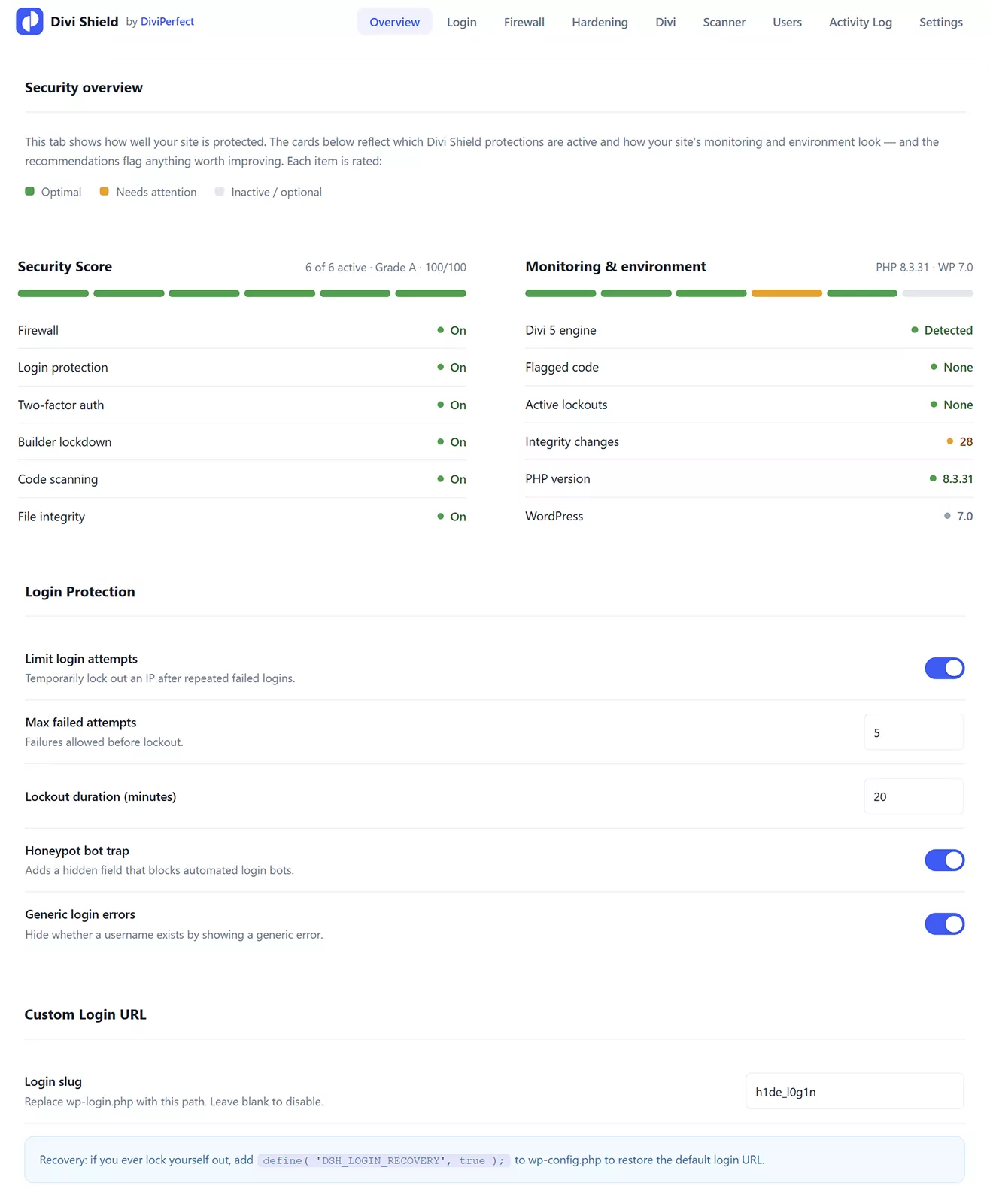
Everything Divi Shield does is managed from a single tabbed dashboard under DiviPerfect → Shield. Each tab controls one layer of protection:
Overview
Your security score and grade, the protections currently active, live monitoring (flagged code, lockouts, integrity changes), and your PHP and WordPress versions.
Login
Brute-force protection: attempt limits, lockout length, the login honeypot, generic error messages, and an optional custom login URL.
Firewall
Rate limits, 404 throttling, bad-bot filtering, your IP allow and deny lists, the client-IP source for sites behind a proxy or CDN, and a live list of Active Lockouts you can clear with one click.
Hardening
Toggles for file-editing lockdown, XML-RPC, REST and author-enumeration blocking, version hiding, security headers, and a Divi-safe Content-Security-Policy.
Divi
The Divi-specific layer: Visual Builder lockdown, Divi Code and imported-layout scanning, and rate limiting on Divi's own REST and AJAX endpoints.
Scanner
File-integrity monitoring: set a trusted baseline, choose a scan schedule, and run a scan on demand.
Users
Self-service two-factor setup (QR code and backup codes), a status table showing which users have 2FA enabled, and a one-click reset for anyone who loses their device.
Activity Log
Two sub-tabs — Security and User activity — each filterable, each with its own Clear log button.
Settings
Email alerts, log retention, keep-data-on-uninstall, and recovery tools.
Getting Protected in Minutes
Shield works the moment it's activated. To get the most out of it, walk through these steps once:
1. Activate Shield — default protections switch on immediately and your IP is allow-listed.
2. Open DiviPerfect → Shield and check your Security Score on the Overview tab.
3. Go to the Users tab and enrol your own account in two-factor authentication — scan the QR code and save your backup codes.
4. Log out and back in with a code to confirm 2FA works, then decide which roles to require it for.
5. On the Divi tab, turn on Builder Lockdown and confirm the Visual Builder still opens for you.
6. On the Scanner tab, set your file-integrity baseline so future changes are detected.
Settings Reference
Firewall
Sets a per-minute request ceiling per IP, throttles repeated 404s (a sign of scanning), blocks known bad bots, and enforces your allow and deny lists. Allow-listed IPs bypass every block — your own IP is added automatically on activation.
Login Protection
After a set number of failed attempts, an IP is locked out for a chosen number of minutes. A hidden honeypot field traps bots, error messages stay generic so usernames aren't confirmed, and you can move the login page to a custom URL.
Two-Factor Authentication
Turn 2FA on site-wide, then require it for specific roles. Each user enrols from DiviPerfect → Shield → Users with an authenticator app and receives ten single-use backup codes. Lost a device? An admin resets that user from the same tab.
Request Hardening
Independent toggles let you disable the theme/plugin file editor, switch XML-RPC off, block REST and author-archive username leaks, hide your WordPress version, and send security headers — including a Content-Security-Policy tuned to keep the Divi builder working.
Divi Protection
Restrict Visual Builder access by role, scan Divi Code modules and imported layouts for risky code, and rate-limit Divi's REST and AJAX endpoints. All Divi protections pause automatically if Divi isn't active.
File Integrity Monitoring
Set a baseline that records the state of your plugin and theme files, then let Shield scan on a daily, twice-daily, or weekly schedule. Changed, added, or removed files are flagged in the log. Shield reports changes — it never modifies or deletes files.
Active Lockouts
The Firewall tab lists every IP currently locked out or temporarily banned, with the reason and time remaining. Unblock any IP instantly, or clear them all — handy if a legitimate visitor gets caught.
Activity Log
The Security sub-tab records blocks, lockouts, hardening events, and alerts, filterable by severity. The User Activity sub-tab records logins, content edits, plugin and theme changes, and user-account changes. Clear each log independently.
Alerts & Score
Get an email when a serious security event occurs (throttled so you're never flooded). The Security Score weighs which protections are enabled and recent activity into a single grade, with recommendations for anything left to switch on.
Support
If you run into any issues or have questions not covered in this documentation, the DiviPerfect support team is happy to help.
Reach out via the support tab on the Elegant Themes Marketplace product page, or email us directly at hello@diviperfect.com. We aim to respond within 24 hours on business days.

Frequently Asked Questions
Find answers to the most common questions about the Divi Shield plugin.
Does Divi Shield replace Wordfence or Sucuri?
No — and it isn't meant to. Shield is a Divi-specialised hardening and login-security layer. It doesn't include a cloud firewall, a malware-signature scanner, or automated malware removal. It pairs perfectly alongside a scanner like Wordfence: Shield handles the Divi-specific protection and hardening, the scanner handles malware signatures.
Will it break the Divi Visual Builder?
No. Builder lockdown only blocks the roles you choose, and the built-in Content-Security-Policy is tuned specifically to keep the Visual Builder working. Allowed users (like administrators) open the builder exactly as before.
Does Divi Shield need Divi to be active?
The core protections — firewall, login, 2FA, hardening, file integrity — work on any WordPress site. The Divi-specific features simply pause until Divi 5 is active.
Will it slow down my site?
No. Shield runs on your server with lightweight checks and makes no external calls, so there's no cloud round-trip on each request.
What if I lock myself out?
Your IP is allow-listed automatically on activation, so routine work won't lock you out. If you ever do get locked out, you can clear lockouts from the dashboard, wait out the timer, or use the built-in recovery constant. Lockouts are by IP address, not by browser.
Will two-factor lock out my clients?
Only if you require it for their role — and even then they enrol themselves and receive ten backup codes. If someone loses their device, an admin resets their 2FA in one click from the Users tab.
Does it scan for malware?
Shield scans Divi Code and imported layouts for risky patterns and monitors your files for unexpected changes (file-integrity monitoring). It does not use a malware-signature database or remove malware — pair it with a dedicated scanner for that.
Can I use it on multiple sites?
Yes. Your Marketplace licence covers unlimited sites, and Shield is configured per site.
Is any of my data sent to a third party?
No. Shield stores its log and settings in your own WordPress database and makes no external API calls.
A scanner IP keeps getting blocked — is that a problem?
That's Shield doing its job. Automated scanning from datacenter IPs is constant background noise on every public site; those log entries are evidence your hardening is catching it. If one IP is persistent, add it to the Deny list.
The Visual Builder won't open after I turned on hardening.
heck the builder-lockdown roles on the Divi tab, and if you enabled the Content-Security-Policy, confirm it's the Divi-safe preset (test CSP on its own to isolate it). Administrators should always keep builder access.